4. Signal Routing, Communication protocols and Device Registration/Control
Routing, Control and Device Management with HOME & VSM
In an SMPTE ST 2110 environment, signal routing is no longer performed using traditional SDI crosspoints. Instead, devices exchange media streams across an IP network, and control systems are responsible for managing the devices that send and receive those streams. HOME provides the infrastructure management and orchestration layer. It manages devices, stream information, registration, configuration and connection state. VSM provides the operational control layer. It allows engineers and operators to build workflows, panels and routing interfaces that control HOME-managed and third-party systems. HOME and VSM work together to simplify this process. HOME provides the underlying routing framework and manages stream connections between devices, while VSM can act as the operational control layer used by engineers and operators to create and manage routes.
This section explains:
- How HOME performs signal routing
- How routing actions are handled internally
- How SDP is used within the workflow
- How VSM integrates with HOME in different routing scenarios
The goal is not to cover every technical detail, but to provide a practical understanding of how routing behaves in a modern IP-based broadcast system.
Signal Routing in HOME
HOME manages signal routing by controlling the information associated with Sources (senders) and Destinations (receivers). Rather than relying entirely on SDP files, HOME stores stream information using its own internal data model. This makes routing faster, cleaner, and easier to manage. SDP is still important in SMPTE ST 2110 systems because it describes how a stream should be received. However, within HOME:
- SDP is mainly used for compatibility and interoperability
- HOME internally works with structured stream data rather than raw SDP text
HOME uses an internal data model to represent media streams and their associated parameters. Where devices require SDP-based configuration, the necessary information can be translated into SDP through the appropriate device integration mechanism, such as a HOME Agent.
Within HOME, a service called Splice coordinates signal-routing operations. When a route is requested, Splice uses the available source and destination information to initiate the required connection changes:
- Splice identifies the selected Source (sender)
- It copies the relevant stream information from the Source to the Destination (receiver)
- The receiving device updates itself and subscribes to the new multicast stream
When a route is disconnected:
- The stream information is removed from the Destination
Importantly:
- HOME only changes the source-related information
- Device-specific receiver settings are left unchanged
Routing from the Stream Routing Page
In HOME, the simplest way to create a route is by using the Stream Routing page.
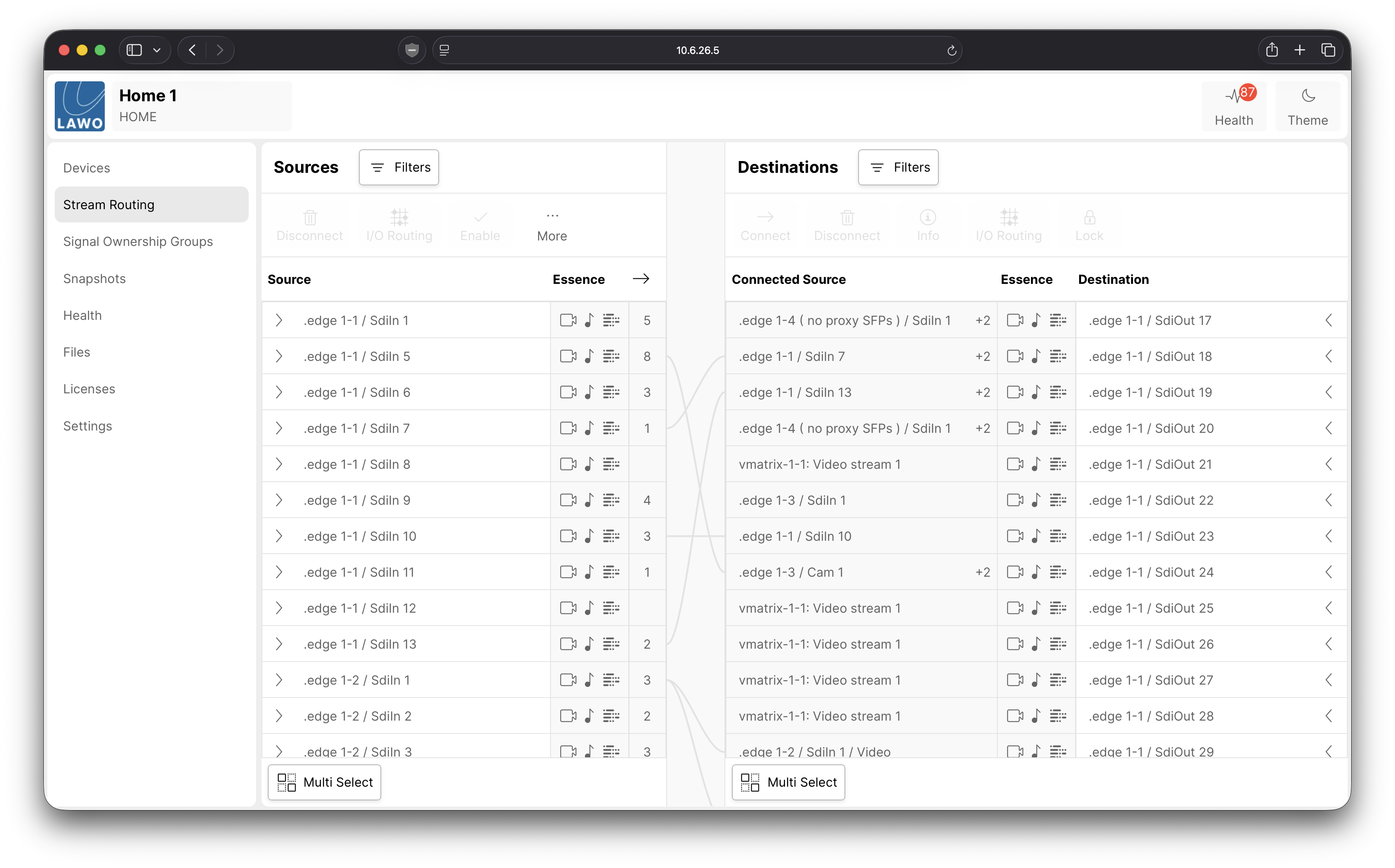
What the User Does:
- Selects a Source
- Select sa Destination
- Presses Connect
What HOME Does:
- The HOME user interface tells Splice to perform a routing action
- Splice executes the routing command
- The receiving device updates itself to receive the selected stream
- The device confirms the change back to HOME
Routing Using SDP Copy & Paste
Another way to create a route is by manually copying SDP information in the Devices page.
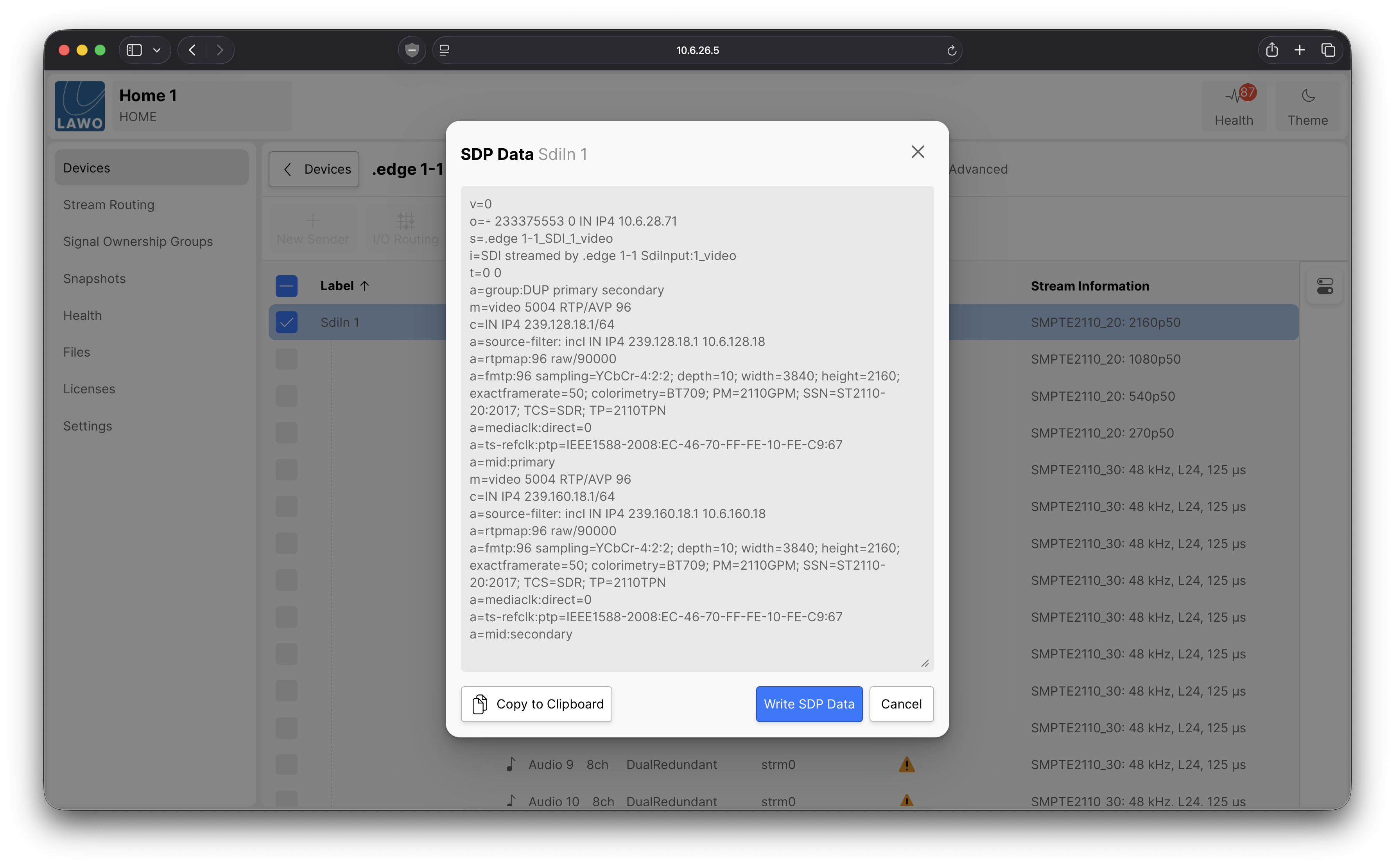
What the User Does:
- Selects a device and copies the SDP data from a Source in the Senders tab
- Selects a device and 'Writes the SDP Data' via the Receivers tab
What HOME Does:
- In this workflow, Splice is bypassed
- The HOME user interface sends the SDP directly to the endpoint device
This method is mainly useful for:
- Troubleshooting
- Interoperability
- Engineering workflows
In the absence of VSM or a broadcast controller, most operators will normally use standard routing through the Stream Routing page instead.
VSM Integration with HOME
The vast majority of IP facilities require a dedicated broadcast controller such as VSM to route signals, typically via hardware or Web UI panels in addition to creating customised workflows. VSM integrates with HOME using the HOME API. For signal routing, this allows VSM to:
- Discover the available Sources and Destinations registered with and managed by HOME
- Request routes using the same routing mechanisms described earlier in this document
Depending on the system configuration, there are different ways VSM can perform routing through HOME.
Enabling 'HOME Native Routing' in VSM
VSM includes an option called HOME Native Routing. This setting determines how routing commands are handled. When HOME Native Routing is enabled:
- VSM uses HOME’s routing service, Splice, to perform routing
- HOME manages the connection between the source and destination devices
In this mode, routing behaves in the standard HOME workflow described earlier.
Disabling 'HOME Native Routing' in VSM
When HOME Native Routing is disabled, VSM does not use HOME’s Splice service to establish signal connections.
- Instead, VSM can use specific commands through the HOME API to apply source SDP information directly to HOME-managed receivers, bypassing HOME’s native routing mechanism.
- This allows VSM to manage routing decisions independently while still using HOME as the communication interface to supported devices.
This is done using specific commands through the HOME API.
This mode is typically used in systems where:
- Some devices are managed by HOME
- Other devices are managed directly by VSM
In these mixed environments, VSM may need to communicate directly with endpoint devices rather than routing entirely through HOME.
CPC Signal Routing in VSM (VSM as the Primary Router)
VSM includes a feature called Crosspoint Centric (CPC), which allows VSM to maintain an authoritative record of the desired routing state. When CPC is enabled, VSM monitors routing assignments and can reapply them if the actual connection state differs from the state maintained by VSM. This is particularly useful during system startup, device reconnection or recovery from temporary communication failures. In this configuration, VSM acts as the primary authority for routing decisions, helping maintain consistency between the operator’s intended routing assignments and the actual connections established within the system.
CPC should be enabled intentionally, because it determines which system is considered authoritative for routing state.
Enabling CPC in VSM
When enabled:
- VSM continuously monitors and maintains routes
- VSM attempts to preserve the last source assigned to a destination
For example:
- A route is created in VSM
- A user later changes that route directly in HOME
- VSM detects the change
- VSM automatically restores the original route
In simple terms: VSM treats its own routing state as the “correct” version and will re-apply it if changes are made elsewhere.
Disabling CPC in VSM
When CPC is disabled, HOME and VSM can make routing changes independently. Assuming both commands are successfully applied, the most recent routing action determines the active connection:
- HOME and VSM can both make routing changes independently
- The active route will simply be whichever command was applied most recently
For example:
- If VSM creates a route first, and HOME changes it later, the HOME route remains active
- If HOME creates a route first, and VSM changes it later, the VSM route remains active
In this mode, neither system attempts to override or restore routes automatically.
The interaction between VSM and HOME depends mainly on two settings:
- HOME Native Routing
- Determines whether routing is performed through Splice or directly via SDP
- CPC (Crosspoint Centric)
- Determines whether VSM actively maintains routes or allows HOME and VSM to operate independently
These options provide flexibility for different workflows and system designs, especially in mixed environments where not all devices are managed entirely through HOME.
Communication Protocols Used by HOME & VSM
The final section of the previous chapter explained how the network hardware connects together to provide POD-to-POD communication. This section focuses on how Broadcast Control systems and Streaming Media devices communicate across that network infrastructure. In an IP-based broadcast facility, media traffic (video, audio and ANC data) is only part of the overall system. Equally important are the communication protocols that allow devices and control systems to:
- Discover each other
- Exchange configuration information
- Establish and remove media streams
- Send control commands
- Share operational status and alarms
These protocols mainly operate within the Broadcast Control network, but they directly influence how the Streaming Media networks behave. They can be thought of as the “conversation layer” of the system. They do not carry video or audio themselves, but they make it possible for the system to function as a coordinated whole.
NATS - Lightweight Messaging for System Coordination
NATS is a lightweight messaging system that forms the foundation of the HOME API. As a result, HOME and many Lawo products use NATS-based communication as their primary method of system coordination. NATS provides:
- Fast message distribution
- A publish/subscribe communication model
- Low-latency event handling
Within HOME, NATS is commonly used for:
- Device registration
- Real-time parameter control
- Creation of multicast transmitters and receivers
- Signal routing and patching
- Status updates and alarms
- System orchestration
- Coordination between software services
Importantly, NATS does not carry media streams. Instead, it carries the control and coordination information that allows the system to operate.
NATS is a fast internal messaging system that keeps software components and devices synchronised.
EmBER+ - Real-Time Parameter Control
The primary control protocol used by VSM is EmBER+. Many third-party control protocols can also be translated into EmBER+ using Lawo’s Gadget Server, allowing VSM to control a wide range of external devices. EmBER+ is widely used in broadcast environments for:
- Real-time parameter control
- Signal routing
- Device control and monitoring
While EmBER+ was developed primarily for device control and parameter management, NMOS initially focused on media resource discovery and connection management through specifications such as IS-04 and IS-05. The NMOS framework has subsequently expanded beyond these original functions. IS-07 introduces event and tally-related capabilities, while IS-12 addresses device control and IS-14 provides a framework for device configuration. Despite these developments, EmBER+ remains widely used for operational control functions such as:
- Mixer control
- Router crosspoints
- Device parameter adjustment
- Tally integration
EmBER+ operates over IP networks and is commonly used in:
- Native IP facilities
- Traditional SDI systems
- Hybrid broadcast environments
Think of EmBER+ as:
A remote control protocol for adjusting device settings in real-time.
VSM also supports the HOME API, which means communication between VSM and HOME itself is NATS-based. For example:
- Devices created in HOME can automatically appear within VSM
- Routing and status information can be shared between both systems
APIs - How Broadcast Systems Exchange Information
Modern broadcast devices often provide APIs using HTTP or HTTPS connections. An API (Application Programming Interface) is a structured way for one software system to communicate with another. Rather than an operator manually configuring settings through a user interface, APIs allow systems to exchange information automatically and consistently. In broadcast environments, APIs are commonly used for:
- Stream configuration
- Device control
- Status monitoring
- Routing requests
- System orchestration
These API exchanges typically use structured data formats such as JSON. Lawo products commonly use:
- The HOME API (NATS-based communication)
- HTTP(S)-based APIs
APIs can be thought of as:
SDPs - Describing a Media Stream
SDPs describe how a media stream should be received. An SDP file typically contains information such as:
- Multicast addresses
- Port numbers
- Source IP addresses
- Codec information
- Timing parameters
When HOME or VSM communicates with devices, SDP-related information is often exchanged through API calls or the HOME API itself.
This allows systems to:
- Establish media connections
- Configure receivers
- Exchange stream parameters automatically
While many device APIs are vendor-specific, standardised mechanisms such as NMOS and SDP help facilitate interoperability between equipment from different manufacturers. NMOS provides APIs for functions such as device discovery, registration and connection management, while SDP describes the technical characteristics of media streams, including the information receivers require to establish and interpret media connections. Together, these mechanisms enable control systems to discover available resources, establish connections and exchange media stream information across compatible devices. This helps make IP broadcast systems:
- Interoperable
- Vendor-neutral
- Easier to integrate
Many third-party vendors support integration with the HOME ecosystem. Devices that support this are often identified using the Lives@HOME designation.
Third-party vendors can choose to implement the HOME API into their products. The 'Lives@HOME' tag is applied to these devices - e.g.
- Meinberg
- Merging Technologies
- DirectOut
- EVS Cerebrum
- Skyline Dataminer
A Software-Defined Broadcast Infrastructure
Together, these protocols create a layered communication environment that replaces the fixed, circuit-based behaviour of traditional SDI systems with a flexible, software-defined approach. Instead of dedicated physical signal paths, modern IP systems rely on coordinated software communication to manage devices, streams and operational control.
Key Communication Protocols - Summary
- HOME API/NATS, EmBER+, NMOS, HTTP APIs and SDP each serve different roles in device registration, control, connection management and stream description.
- HTTP(S) API calls carry configuration instructions
- SDP defines the stream parameters
- NATS distributes internal system messages
- The HOME API (NATS) and EmBER+ can control device parameters in real-time
Device Registration & Control
Managing devices in an IP broadcast environment involves more than simply connecting hardware to a network. Devices must also be:
- Registered and discovered
- Monitored
- Configured
- Controlled
Lawo’s HOME platform provides a centralised system for device inventory, registration and control within an IP-based broadcast environment.
Device Registration
As discussed earlier, HOME maintains the inventory of Lawo and Lives@HOME devices within the facility. Devices can communicate with HOME using either in-band or out-of-band communication methods. Most Lawo devices use the HOME API as their primary communication protocol. By default, Lawo devices are shipped with a nats.home entry configured as the HOME server address. If the facility includes a DNS server that resolves nats.home to the IP address of a HOME server, the device can automatically register itself with HOME.
In environments without DNS, the IP address of the HOME server must be entered manually into the device configuration. Once registered, HOME can:
- Identify the device
- Display it within the system inventory
- Monitor operational status
- Manage configuration
- Make the device available for control and routing
VSM also communicates with HOME using the HOME API. To integrate VSM with HOME, an engineer configures a HOME communication port within VSM and specifies the IP address(es) of the HOME server(s). Once connected, information stored within HOME — such as device registration, routing and parameter control — becomes available within VSM automatically.
From an engineering perspective, HOME effectively becomes the 'system directory' of supported devices within the facility.
Instead of manually tracking IP addresses or logging into individual devices, engineers can manage and monitor devices through a single unified platform.
HOME also maintains awareness of:
- Device identity
- Software versions
- Available resources such as DSP cores or media interfaces
- Network connectivity
- Operational health and status
This centralised approach simplifies both system management and future expansion.
Not all Lawo devices communicate with HOME in exactly the same way. Some devices use proxy or translation services to integrate with the HOME API.
Examples include:
- Power Core, LCU and N73 devices
- Use a proxy service running on the HOME server or cluster
- The proxy translates the device’s native communication protocol into NATS-based communication
- A__UHD Core and A__line devices
- Use a HOME Agent running locally on the device
- The HOME Agent translates native communication protocols into HOME API communication
Device Control
Once devices are registered, they can be controlled through HOME, VSM, or both. Together, HOME and VSM provide:
- Centralised configuration and monitoring
- API-based integration with external systems
- Real-time coordination between devices and services
Examples of controllable functions include:
- PTP domain configuration
- Microphone preamp settings
- Colour correction parameters
- Signal routing
- Internal matrix control
- Stream patching
Control via APIs and Messaging
The HOME API and VSM Gadget Server allow external systems — such as broadcast controllers, automation systems and orchestration platforms — to interact with registered devices in a structured and predictable way. Internally, HOME uses NATS as its messaging infrastructure. NATS distributes system messages between software services and devices, allowing the system to remain synchronised in real time. For example:
- HOME or VSM initiates the routing operation according to the configured routing mode
- When HOME Native Routing is used, HOME’s Splice service coordinates the connection. Alternatively, VSM can use the HOME API to apply stream information directly to HOME-managed receivers
- The receiving device applies the required stream configuration and reports its updated status through the appropriate control interface
This architecture provides:
- Centralised control
- Clean API-based integration
- Scalable multi-device coordination
- Fast system responsiveness
In simple terms:
Device Integration via GCF
Modern IP facilities are rarely built using equipment from a single manufacturer. To support multi-vendor environments, HOME provides the Generic Control Framework (GCF), which enables third-party equipment to be integrated into the HOME control environment. GCF provides a structured mechanism for representing device parameters, status information and control functions within HOME. Depending on the device and its integration, communication may involve device-specific APIs or protocols, with the relevant information translated into a format that HOME can understand. Through GCF:
- Supported third-party device parameters and status information are represented within HOME using a common data model
- HOME can discover and display those parameters
- Devices appear within the HOME inventory alongside Lawo equipment
- Control commands can be passed through HOME to the third-party device
This allows non-Lawo equipment to participate in the same unified control environment. In practical terms:
GCF allows HOME to operate as a single control layer across a multi-vendor IP broadcast facility.
Devices that implement the HOME API and support the Lives@HOME ecosystem can often be controlled in much the same way as native Lawo devices.
From Baseband to Software-Defined Management
In traditional baseband facilities, device management was often manual and distributed across many independent systems. In IP-based facilities, centralised registration and API-driven control provide:
- Improved operational visibility
- Faster commissioning
- Easier scalability
- Reduced operational complexity
- Better integration with automation and orchestration systems
By combining device registration, messaging infrastructure and API-based control, HOME and VSM provide the management layer that ties together media transport, routing and device configuration within an SMPTE ST 2110 environment.
Device Registration & Control - Summary
- Devices register with HOME either through DNS resolution of nats.home or by manually configuring the HOME server IP address
- Device information and control parameters can be shared with VSM through the HOME API
- GCF allows third-party devices to expose control and monitoring parameters to HOME in a device-independent way
- HOME and VSM together provide a centralised management and control layer for IP broadcast systems
Having covered the core technologies and communication methods used within an IP broadcast environment, the next chapter brings these concepts together through a set of practical example scenarios.